Wednesday, April 21, 2010

Sogeti TMAP process template certified and ready


Today we finalized the RTM version of our TMAP process template and it will soon be available for free download from the official TMAP.Net site there you also can find more information about the TMAP process and the latest news from the testing field. You can also go directly to the download page located at http://eng.tmap.net/Home/archief/957794.jsp.

Certified process template
Sogeti's TMAP template has as the first template passed the new Visual Studio Certified Process Templates Program announced by Microsoft and can therefore use the new Certified process template logo. If you want to know more about the certification program Stephanie Saad Cuthbertson has a post on the details.

TMAP.codeplex.com
The TMAP template will continue to develop and improve on codeplex. You will still find the latest bits and contribute on the future directions of the TMAP process template by filing feedback and suggestions at tmap.codeplex.com.

Upgrading TFS 2010 RTM from pre-release versions

Today I upgraded one of our internal pre-release server and moved in to a new machine. What before in the old days with TFS2008 could be a real painful experience taking several hours or even days to perform could now mostly be handled in an hour.

Preparations
This post is simply a brief description of the main steps and what to do and expect. If you want a more detailed information and as preparation always is the key to success I recommend you to read the following
Backup and In place upgrade
The first step is to backup the current environment, be it databases or taking a snapshot of your existing environment. Once that's done Its time to uninstall the previous installed pre-release versions. You can leave the .Net framework as it will be upgraded, but TFS2010 Beta2/RC must be uninstalled. After removing the Pre release versions simply install TFS2010 RTM, It's a very easy and quite fast but did take me a reboot to finish it.
Once installed its time to configure your server. If your moving from prerelease versions it's important that you select Upgrade in the first page of the configuration wizard. Follow the steps of the wizard and then you finish the upgrade you will have an upgraded Team Project Collection.

Move to new machine = Detach, Move, Attach
If you want to move to a new clean machine (without any previous installed beta software) you simply Detach your newly upgraded team project collection using Team Foundation Administrative Console. Once detached backup the database TFS_MyProjectcollectionName to file using SQL Manager.
Now it's time to move to a new fresh start. Simply Install and configure TFS2010 RTM on a clean machine. After its done, restore the previous backed up database to the new SQL Server using SQL Manager. Once installed its time to attach, simply point out the database and attach it to your server and you now have your upgraded team project collection up and running on your new server.

Friday, April 9, 2010

Tool for import word test case documents to Microsoft Test Manager

Updates to my extensions of the TestCase Migrator Tool http://mskold.blogspot.com/2010/06/updates-to-my-extensions-of-testcase.html

Recently I had a case there I needed to import old test cases written in word into Microsoft Test Manager. I looked around for a tool capable of importing an ordinary test case written in word, but I didn't find any tool or solution.

Word - the world's most used test tool ?
In my experience most projects who have had formalized test cases has done them in word documents containing test case information (title of the test case, description, pre-conditions, use case identification) and test steps. The test steps has the format of a table with columns for actions and expected results.

Test Case Migration Tool on codeplex
The best match I found was the Test Case Migrator Tool on codeplex (http://tcmimport.codeplex.com). With this tool I could import Excel test cases and MTH files (Microsoft's word template for test cases from earlier versions of Microsoft Test Edition). This looked like a promising tool but when I tried it on our existing test cases written by a standard test case template the tool didn't manage to import the test cases. It seemed the tool was to hard connected to the structure of the MTH template.

Extending the Test case migration Tool
As the project was on codeplex with the source code available I did take a look to see if I could adopt the tool to our template. As the tool had a nice separation of the logic for parsing and importing data sources , I simply created a new data source and wrote my own parsing logic for our template. At first i simply replaced the MTH data source with my, but ones I got the parsing logic to work I started to integrate it as a new data source in the UI. This turned out to be a bigger task then writing the parsing logic. It took some time but at least the result looks good.

The extended Test Case Migration Tool is available
I have uploaded both the compiled version and the source with my modifications as I guess many other will find themselves in the same situation as I was - looking for a tool to batch import word test cases. Hopefully this could be a solution for some of you .

Thursday, April 8, 2010

Contacting all users running non Tfs2010 compatible clients


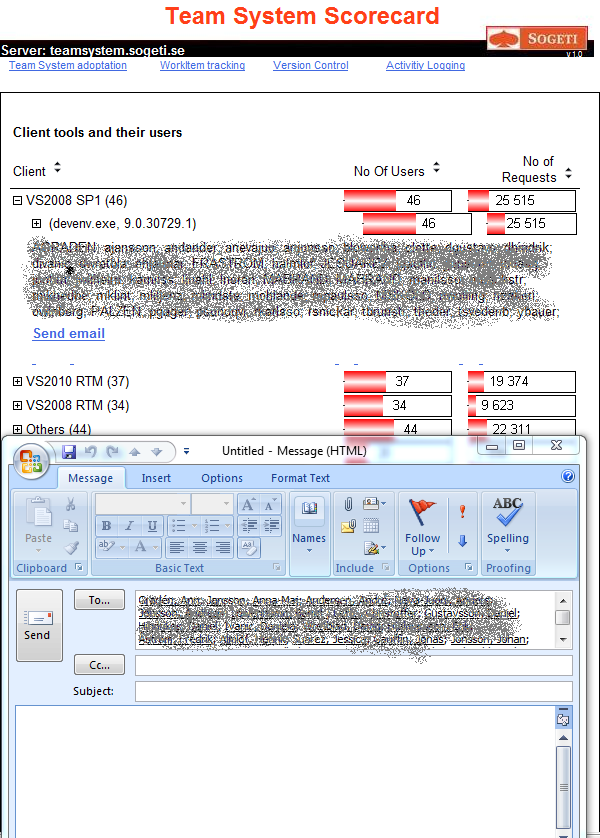
Looking at migrations of several tfs servers with 100+ users, I got the urgent need to track and inform users not already upgraded vs2008 & vs2005 with forward compatibility pack. Tracking is easy, I use the Tfs Scorecard and its activity logging features to figure out who is running vs200 RTM and SP1 clients. The problem is that I don't get a good list to paste into a mail, due to reports format and user formats.

Easier to send mail
After looking at the report a number of times and thinking " It would be good to have an send mail button" I finally did something about it. In the Tfs Scorecard clients report I added a list of user accounts and a Send Email link creating a new email with all email addresses, visible if you expand the first level.
This latest feature is now available in source control at http://tfsscorecard.codeplex.com , direct link http://tfsscorecard.codeplex.com/SourceControl/changeset/changes/46822

Friday, March 26, 2010

Swedish site about VS2010 TMAP process template

Now you can read more about Sogeti's TMAP process template for Visual Studio 2010 (in Swedish). At www.sogeti.se/Test-Microsoft you can find a brief description of Microsoft test tools and Sogeti's TMAP process template.

TMAP Flyers
You can also download flyers (in Swedish) for the VS2010 TMAP and process template. There is also flyers focused only on TMAP as a method and Sogeti's other testing services.

Events about TMAP and Microsoft Test tools
You can also find information about upcoming events around Microsoft test tools and TMAP. The first event will be at Microsoft Sweden on the 23 of April. This event will be followed by several events around the country.

Tuesday, March 9, 2010

TMAP for VS2010 RC released

Clemens just released a new version of Sogetis TMAP process template for VS2010. Ive just started to install it on our swedish 2010 pre-release server so our swedish testers can evaluate ,learn and contribute to it.

Sunday, February 28, 2010

Upgrading TFS event subscriptions to 2010 SDK

Some days ago I started to upgrade one of my TFS customization to the 2010 SDK. The application I moved uses WCF to host its services and automatically subscribes and consumes TFS events. It didn’t turn to be the easy, straight on upgrade I thought it should be. This is my findings during the upgrade.

Relocated TFS SDK assemblies
The first (and about the only) thing I expected was to be replace TfsServer with TfsTeamProjectCollection, and in some cases TfsConfigurationServer. Moving my solution over to a new and clean machine with only VS2010 on it, I discovered that the Tfs SDK Assemblies has moved away from its old locations. After some searching I found the new location C:\Program Files\Microsoft Visual Studio 10.0\Common7\IDE\ReferenceAssemblies\v2.0

Where did IEventService go ?
After finding the new assemblies, replaced TfsServer with TfsTeamProjectCollection I still had some compiler errors, the IEventService interface was unknown? I tried to search for any information about changes in 2010 but came up short. After some searching I found it again. It had simply moved around in the namespaces and is now located at Microsoft.TeamFoundation.Framework.Client namespace.

Windows 7 security
With all compiler errors fixed, it was time for a first test. I started the application and got direct failure. It turns out that you have to grant rights to url namespaces with
netsh http add urlact url=http://+:8001/ServiceUrl user=mydomain/mysuser
After granting rights to my user the the services starts and the application subscribes to events.

TFS2010 switched to Soap1.2
After some testing I don’t receive any incoming notifications. Following Grant holidays post TFS2010: Diagnosing Email and SOAP subscription failures (http://blogs.msdn.com/granth/archive/2009/10/28/tfs2010-diagnosing-email-and-soap-subscription-failures.aspx) shows me the following error
HTTP code 415: Cannot process the message because the content type 'application/soap+xml; charset=utf-8' was not the expected type 'text/xml; charset=utf-8'
This indicates that tfs has switch to Soap 1.2. To solve this I simply switch the bindings of my services from BasicHttpBinding till wsHttpBinding

Finaly working
The last thing it took to get the events working was to change the security mode to SecurityMode.None. So if you want to set up an WCF endpoint this code will do it, without any extra configuration files.

Uri baseaddress = new Uri("http://" + System.Environment.MachineName + ":8001");
srvHost = new ServiceHost(typeof(NotificationServiceImpl), baseaddress);


// Check to see if the service host already has a ServiceMetadataBehavior
ServiceMetadataBehavior smb = srvHost.Description.Behaviors.Find();
// If not, add one
if (smb == null)
smb = new ServiceMetadataBehavior();
smb.HttpGetEnabled = true;
smb.MetadataExporter.PolicyVersion = PolicyVersion.Default;
srvHost.Description.Behaviors.Add(smb);
// Add MEX endpoint
srvHost.AddServiceEndpoint(
ServiceMetadataBehavior.MexContractName,
MetadataExchangeBindings.CreateMexHttpBinding(),
"mex"
);

srvHost.AddServiceEndpoint(typeof(INotificationService), new WSHttpBinding(SecurityMode.None ), "StructureChangeNotify");
srvHost.Open();


Complete code
Below you can find the complete code, you can also download a zip file with the solution from my skydrive http://cid-5d46cae8c0008cf0.skydrive.live.com/self.aspx/.Public/EventSubscriber2010.zip

// INotifyServices.cs
namespace EventSubscriber
{
[ServiceContract(Namespace = "http://schemas.microsoft.com/TeamFoundation/2005/06/Services/Notification/03")]
public interface INotificationService
{


[OperationContract(Action = "http://schemas.microsoft.com/TeamFoundation/2005/06/Services/Notification/03/Notify", ReplyAction="*")]
[XmlSerializerFormat(Style = OperationFormatStyle.Document)] /* Took me hours to figure this out! */
void Notify(string eventXml, string tfsIdentityXml);


}
}


//
NotifyServices.cs
namespace EventSubscriber
{
public class NotificationServiceImpl : INotificationService
{
void INotificationService.Notify(string eventXml, string tfsIdentityXml)
{
MessageBox.Show(eventXml);
}
}
}

// Form.cs
using System;
using System.Windows.Forms;
using Microsoft.TeamFoundation.Framework.Client;
using Microsoft.TeamFoundation.Client;

using System.ServiceModel;
using System.ServiceModel.Description;


namespace EventSubscriber
{


public partial class Form1 : Form
{
protected ServiceHost srvHost;
protected int subscriptionId;


public Form1()
{
InitializeComponent();
}


private void cmdStartWCF_Click(object sender, EventArgs e)
{

Uri baseaddress = new Uri("http://" + System.Environment.MachineName + ":8001");
srvHost = new ServiceHost(typeof(NotificationServiceImpl), baseaddress);


// Check to see if the service host already has a ServiceMetadataBehavior
ServiceMetadataBehavior smb = srvHost.Description.Behaviors.Find();
// If not, add one
if (smb == null)
smb = new ServiceMetadataBehavior();
smb.HttpGetEnabled = true;
smb.MetadataExporter.PolicyVersion = PolicyVersion.Default;
srvHost.Description.Behaviors.Add(smb);
// Add MEX endpoint
srvHost.AddServiceEndpoint(
ServiceMetadataBehavior.MexContractName,
MetadataExchangeBindings.CreateMexHttpBinding(),
"mex"
);

srvHost.AddServiceEndpoint(typeof(INotificationService), new WSHttpBinding(SecurityMode.None), "WorkItemChangedNotify");


srvHost.Open();

lblRunning.Text = "Running";


}

private void cmdStopWCF_Click(object sender, EventArgs e)
{
srvHost.Close();
lblRunning.Text = "Stoped";


}


private void cmdSubscribe_Click(object sender, EventArgs e)
{


TfsTeamProjectCollection tpc = TfsTeamProjectCollectionFactory.GetTeamProjectCollection(new Uri(txtServerUrl.Text));
tpc.EnsureAuthenticated();


IEventService eventService = tpc.GetService(typeof(IEventService)) as IEventService;
DeliveryPreference delPref = new DeliveryPreference();
delPref.Address = "http://" + System.Environment.MachineName + ":8001/WorkItemChangedNotify";
delPref.Schedule = DeliverySchedule.Immediate;
delPref.Type = DeliveryType.Soap;


subscriptionId = eventService.SubscribeEvent(System.Environment.UserDomainName + "\\" + System.Environment.UserName, "WorkItemChangedEvent", "", delPref);
lblSubId.Text = subscriptionId.ToString();


}

private void cmdUnsubscribe_Click(object sender, EventArgs e)
{

TfsTeamProjectCollection tpc = TfsTeamProjectCollectionFactory.GetTeamProjectCollection(new Uri(txtServerUrl.Text));

IEventService eventService = tpc.GetService(typeof(IEventService)) as IEventService;
eventService.UnsubscribeEvent(subscriptionId);
lblSubId.Text = "na";
}


}