Last week I did a quick job to unblock a rangers project and create a command line tool for managing team and team members. Although the tool released quickly unblocked the rangers project, the feature set was far from complete, so why leave it half done?
Short recap
In the beginning of June my fellow rangers discovered a missing feature, there was no tooling to enable automation of managing the new features of teams and team members in TFS 2012 RC. A day later we had a working solution with the basic feature set (List teams, create team, add user to team) that after reviews got published as a code sample. For those more interested you can read more about it the following posts http://blogs.msdn.com/b/willy-peter_schaub/archive/2012/06/13/highlighting-the-decline-of-alm-rangers-cadence.aspx and http://blogs.msdn.com/b/visualstudioalm/archive/2012/06/11/quick-response-sample-command-line-utility-to-manage-team-foundation-server-teams-and-users.aspx
Completing the feature set
After a short brainstorming exercise I came up with the following basic features ListTeams, GetDefaultTeam, SetDefaultTeam, CreateTeam, DeleteTeam,RenameTeam, ListTeamMembers, addUser, RemoveUser as a suitable feature set for a first release. As I got most things setup and figured out already it didn’t take long to implement the complete feature set.
The resulting exe and source code can now be downloaded from my skydrive until I can get an official place to put it to.
Next step
The next step is most likely to release it on codeplex and Visual Studio Gallery as a community tool. And then start building a backlog, witch at the moment contains a couple of minor fixes and perhaps looking to add PowerShell Commandlets to it.
Monday, June 18, 2012
Thursday, June 7, 2012
Generate accumulated Release Notes in TFS build, part II
By using the BuildReport and CompareLabel activities we can create a build report, but can it be transformed into a release notes document ?
This post continues the previous post Generate accumulated Release Notes in TFS build http://mskold.blogspot.se/2012/05/generate-accumulated-release-notes-in.html
The out of the box report
By default the build report activity generates a report that is "changesets" centric, It lists all changesets the files and associated work items of each changesets. This might be good for a build report, but if you want a release note report, you probably would want it "work item centric", listing associated work item first and maybe list changesets without work item as Undocumented changes.
Changing the output
Luckily for us, we have the option to change the output. The BuildReport activity creates a xml file with the report data and then creates a html report by applying a xslt transformation. By supplying our own xslt file we can customize the output to suite us better, with some libations as we're bound to the data in the xml file.
The customized report
Even though the xml data isn't structured in the way we would prefer for our needs, actually the row xml data is also kind of changesets centric. But by using xslt it's still possible to extract a list of work items. By applying this xslt file https://skydrive.live.com/?cid=5D46CAE8C0008CF0&id=5D46CAE8C0008CF0!1058, the resulting report looks something like this.
This post continues the previous post Generate accumulated Release Notes in TFS build http://mskold.blogspot.se/2012/05/generate-accumulated-release-notes-in.html
The out of the box report
By default the build report activity generates a report that is "changesets" centric, It lists all changesets the files and associated work items of each changesets. This might be good for a build report, but if you want a release note report, you probably would want it "work item centric", listing associated work item first and maybe list changesets without work item as Undocumented changes.
Changing the output
Luckily for us, we have the option to change the output. The BuildReport activity creates a xml file with the report data and then creates a html report by applying a xslt transformation. By supplying our own xslt file we can customize the output to suite us better, with some libations as we're bound to the data in the xml file.
The customized report
Even though the xml data isn't structured in the way we would prefer for our needs, actually the row xml data is also kind of changesets centric. But by using xslt it's still possible to extract a list of work items. By applying this xslt file https://skydrive.live.com/?cid=5D46CAE8C0008CF0&id=5D46CAE8C0008CF0!1058, the resulting report looks something like this.
Tuesday, May 22, 2012
Community TFS Build Manager – Change Drop Location Preview
A couple of weeks ago I was faced with a sudden replacement of the server hosting the drop file share for a collection hosting 150+ builds. Even though it didn’t’ please some of the builds admins, I remained calm and promised them I could easily change drop locations for all builds with the Community TFS Build Manger. I was quite sure the Build Manager had a feature to batch change the drop location of selected builds.
But I was wrong
Much to my surprise I couldn’t find any way to change the drop location using the Community Build Manager. I can say I looked for more than a while, as I was quite sure it was possible, but at last I had to surrender to the state that it wasn’t possible using tfs build manager. Somehow I must have mixed up the feature set with my own hacks or simply assumed it would be included.
No need to panic ;)
I knew I had implemeted a similuar feature a long time ago, After a short diging I found what I was looking for. I had implemented a Change Drop Location feature back in 2009 in a tool/hack TfsBuildAdmin and I could probably use it or rewrite it again. It turned out that the 2009 TfsBuildAdmin tool was against the old build API and I had already rewritten the Change Drop Location feature against the new tfs2010 build API. This meant that I had a solution to batch update 150 build drop locations. First problem solved!
A promise is a promise
But I still had a problem; I kind of had promised that the Change Drop Location feature was included in the Community TFS build Manger. And of course it would be best to have such features integrated in a common tool like Build Manager. So I simply emailed Jakob Ehn and Michael Fourie and described the problem, the solution and offered to assist in developing the feature set.
Build Manager Change Drop Location feature This is the result so far, then selecting (multiple) builds and right clicking you get a new menu item Change Drop Location. Once selected it presents you a form to select update method. You can do both search and Replace updates and force a standard drop location for all build definitions using a couple of macros such as $(TeamProject) and $(BuildServer)
You also have an option to update drop locations for existing builds (to ensure that the link in the build reports works for existing or old builds)
Preview download available
If you can’t wait until the next release of Tfs Community Build Manager I have put together a preview of the standalone application with the Change Drop Location feature enabled. You can download it from my SkyDrive https://skydrive.live.com/?cid=5d46cae8c0008cf0&resid=5D46CAE8C0008CF0!1052&id=5D46CAE8C0008CF0!1052
Update 2012-06-02 This code is now committed to the main branch for Tfs Build Community extensions and can be downloaded and built using the following changeset http://tfsbuildextensions.codeplex.com/SourceControl/changeset/changes/76886.
Monday, May 14, 2012
Test Attachments Sizes: New feature of TFS Administrators Toolkit
If you have experienced rapid growth of your tfs database size you have hopefully aware of the Test Attachments Cleaner Power tool. If you have used it you probably also noticed that it’s easier to do the cleaning then to find out what’s needs cleaning.
Test Attachments Power tool – Missing pieces
The problem is that you need to know what team project that needs cleaning and what kinds of attachment it has. There are a couple of posts out there with SQL to run against the TFS Production databases, which by the way is not supported. Once you know what projects to clean and what the attachments data consist of, you can create a command line that calls the test attachments cleaner power tool to do the cleaning.
If you have about 100+ team projects to handle this is far from the best experience. What you really would like is an easy way to:
1) Find team projects with large attachment sizes.
2) Analyze the structure of test attachment data.
3) Select action and kick of the test attachment cleaner power tool.
Test Attachment Sizes window in Tfs Administrators Toolkit
As I manage a couple tfs servers with 100+ team projects I decided to try to fill the gap. The result of my effort is the new Test Attachment Sizes window in Tfs Administrators Toolkit. It gives you the following features:
• Breakdown of totals Test Attachments sizes by type and extensions.
• A sortable list with team project and its total test attachment size
• Breakdown of team project test attachments by type and extensions
• Selecting action and calling Test Attachment Cleaner power tool, either direct or generating a bat file
I’ve released an updated version of the Tfs Administrators Toolkit with the new Test Attachments Sizes feature along with some minor fixes at http://visualstudiogallery.msdn.microsoft.com/11f5e313-ced1-4713-9794-d7300c7d12e0
Test Attachments Power tool – Missing pieces
The problem is that you need to know what team project that needs cleaning and what kinds of attachment it has. There are a couple of posts out there with SQL to run against the TFS Production databases, which by the way is not supported. Once you know what projects to clean and what the attachments data consist of, you can create a command line that calls the test attachments cleaner power tool to do the cleaning.
If you have about 100+ team projects to handle this is far from the best experience. What you really would like is an easy way to:
1) Find team projects with large attachment sizes.
2) Analyze the structure of test attachment data.
3) Select action and kick of the test attachment cleaner power tool.
Test Attachment Sizes window in Tfs Administrators Toolkit
As I manage a couple tfs servers with 100+ team projects I decided to try to fill the gap. The result of my effort is the new Test Attachment Sizes window in Tfs Administrators Toolkit. It gives you the following features:
• Breakdown of totals Test Attachments sizes by type and extensions.
• A sortable list with team project and its total test attachment size
• Breakdown of team project test attachments by type and extensions
• Selecting action and calling Test Attachment Cleaner power tool, either direct or generating a bat file
I’ve released an updated version of the Tfs Administrators Toolkit with the new Test Attachments Sizes feature along with some minor fixes at http://visualstudiogallery.msdn.microsoft.com/11f5e313-ced1-4713-9794-d7300c7d12e0
Etiketter:
Admin,
Test,
Test Attachments,
TFS Administrators toolkit
Saturday, May 5, 2012
Generate accumulated Release Notes in TFS build
Have you ever wanted to have the build process generate an automated generated release notes document for all changes accumulated form the last release? This is how you can do it with Tfs Build Extensions.
The plan
The plan is simple, Let the user set a baseline label name in the build definition, get a list of changesets by comparing the baseline label with the current build label. From the list of changesets get comments, Associated Work items and changed files. With the list of changesets and work items it should be possible to generate a Release Notes document.
Now all we need to do is code this, or even better reuse something existing. Now, if you’re trying to do something within build automation, and you would need to write your own custom activities you should probably start by looking at the Community TFS build extensions project at codeplex, before you start coding.
TFS Build extensions BuildReport and CompareLabels activities
A fast look at the list of activities in the shows two interesting candidates, there is both a CompareLabels and an BuildReport activity.
Looking a bit closer, the CompareLabels activity takes two Labels and generates a list of changesets and the BuildReport activity takes a list of changesets and generates a build report in .html or .txt and you can customize the generated report by applying your own xslt transformation fie.
This is about everything we need and we should hopefully only need to drag the activities into our build process workflow and make sure we pass the output list of changesets from the CompareLabels activity to the BuildReport input parameter.
The hiccups
Putting the plan to work, we soon run into to trouble, to start with the CompareLabels activity doesn’t takes label names as input as one might hope for, instead it requires VersionControlLabel objects, and on top of that it also needs a VersionControlServer object.
At first, this may be discouraging, but it isn’t such a big problem as we can use the tfs api directly inside the build workflow, and if we manage to get an VersionControlServer we could use it to get a the VersionControlLabel objects by using the QueryLabels method of VersionControlServer.
Getting a VersionControlServer
First we need to get an instance of a VersionControlServer, so we start by declaring it as a variable. The VersionControlServer is created by calling GetService() of a tfsTeamProjectCollection object. If we have the Uri of the teamprojectcollection we can create it by specifying it in the constructor. We can get the Uri for the current collection from the BuildDetail object we have in our build. Putting it all together in (vb.net) results in this expression
Getting the VersionControlLabel for a label name
Once we got the scSrv we can use the QueryLabels method to get our VersionControlLabel objects from the LabelName. We have the current label in BuildDetail.BuildLabelName, but it expressed as Labelnamne@sourcecontrolpath. What we need to pass into the QueryLabel is label name and source control path in different variables.
We need to split the string into two separate strings (currentLabelName and sourcecontrolPath) by using the split method as follow.
currentLabelName = BuildDetail.LabelName.Split(New Char() {"@"c})(0)
labelSrcPath = BuildDetail.LabelName.Split(New Char() {"@"c})(1)
Now we can call QueryLabel to get the VersionControlLabel objecs,
Stitching it together
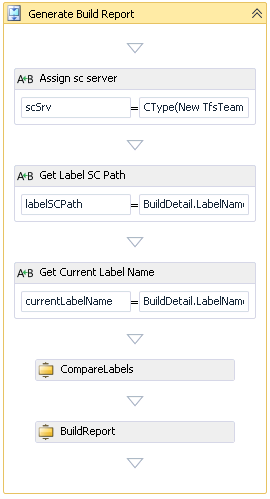
Now we got everything figured out, now we just need to complement our sequence with a couple of assigns to get the VersionControlServer and splitting the labelstring.
We also got to change the properties of the CompareLabels activity to use QueryLabel method.

Running this could be a bit noisy in the build log, so to make it a bit more silent, we can manully editing the xaml file and add
The plan
The plan is simple, Let the user set a baseline label name in the build definition, get a list of changesets by comparing the baseline label with the current build label. From the list of changesets get comments, Associated Work items and changed files. With the list of changesets and work items it should be possible to generate a Release Notes document.
Now all we need to do is code this, or even better reuse something existing. Now, if you’re trying to do something within build automation, and you would need to write your own custom activities you should probably start by looking at the Community TFS build extensions project at codeplex, before you start coding.
TFS Build extensions BuildReport and CompareLabels activities
A fast look at the list of activities in the shows two interesting candidates, there is both a CompareLabels and an BuildReport activity.
Looking a bit closer, the CompareLabels activity takes two Labels and generates a list of changesets and the BuildReport activity takes a list of changesets and generates a build report in .html or .txt and you can customize the generated report by applying your own xslt transformation fie.
This is about everything we need and we should hopefully only need to drag the activities into our build process workflow and make sure we pass the output list of changesets from the CompareLabels activity to the BuildReport input parameter.
The hiccups
Putting the plan to work, we soon run into to trouble, to start with the CompareLabels activity doesn’t takes label names as input as one might hope for, instead it requires VersionControlLabel objects, and on top of that it also needs a VersionControlServer object.
At first, this may be discouraging, but it isn’t such a big problem as we can use the tfs api directly inside the build workflow, and if we manage to get an VersionControlServer we could use it to get a the VersionControlLabel objects by using the QueryLabels method of VersionControlServer.
Getting a VersionControlServer
First we need to get an instance of a VersionControlServer, so we start by declaring it as a variable. The VersionControlServer is created by calling GetService() of a tfsTeamProjectCollection object. If we have the Uri of the teamprojectcollection we can create it by specifying it in the constructor. We can get the Uri for the current collection from the BuildDetail object we have in our build. Putting it all together in (vb.net) results in this expression
scSrv=CType(
New TfsTeamProjectCollection(
New Uri(BuildDetail.BuildServer.TeamProjectCollection.Uri.ToString())
).GetService(GetType(VersionControlServer))
, VersionControlServer)
New TfsTeamProjectCollection(
New Uri(BuildDetail.BuildServer.TeamProjectCollection.Uri.ToString())
).GetService(GetType(VersionControlServer))
, VersionControlServer)
Getting the VersionControlLabel for a label name
Once we got the scSrv we can use the QueryLabels method to get our VersionControlLabel objects from the LabelName. We have the current label in BuildDetail.BuildLabelName, but it expressed as Labelnamne@sourcecontrolpath. What we need to pass into the QueryLabel is label name and source control path in different variables.
We need to split the string into two separate strings (currentLabelName and sourcecontrolPath) by using the split method as follow.
currentLabelName = BuildDetail.LabelName.Split(New Char() {"@"c})(0)
labelSrcPath = BuildDetail.LabelName.Split(New Char() {"@"c})(1)
scSrv.QueryLabels(currentLabelName ,
labelSCPath, Nothing, False)(0)
scSrv.QueryLabels(BuildReportFromBuildLabel,
labelSCPath, Nothing, False)(0)
Stitching it together
Now we got everything figured out, now we just need to complement our sequence with a couple of assigns to get the VersionControlServer and splitting the labelstring.
We also got to change the properties of the CompareLabels activity to use QueryLabel method.

Running this could be a bit noisy in the build log, so to make it a bit more silent, we can manully editing the xaml file and add
mtbwt:BuildTrackingParticipant.Importance="None" to each activity we want to exlude the output from.
We also need to declare the input baseline label name as an build argument and make it visible in the edit build definition form. This is done by fist adding a build argument like this:
To make it visible in the builddefinition editor we need add metadata for the build argument, this is done by locating the Metadata argument and clicking the edit button. We simply add an item for our baseline build label and selects the desired visibility in the View this parameter when dropdown. To make it visible in the build defninition editor select Only while editing a definition
The result
Before we run the build we need to specify the label name of the last release, so that we can get all changes after that label into our release document.
Running the build will generate a ReleaseNotes.txt, a RelaseNote.html and a ReleaseNotes.xml file in the root of the drop folder. This document is rather changesets oriented, but by supplying our own xslt file we should be able to turn the release document into a list of work items, and if we like list all changesets with comments.
Thursday, April 19, 2012
Minor updates to TFS Administrators Toolkit
Ive just uploaded an update to the TFS Administrators Toolkit fixing the following UI glitches:
- Unified the UI in the same style
- Update Reports now works with resizing windows
- Update Work Item Types now works with resizing windows
- Source Control Folder Size now shows sizes in a own column
- Search Large files better formating of Size column
Etiketter:
Admin,
TFS Administrators toolkit,
VS Extensions
Monday, April 9, 2012
TFS 2010 Team Alert Subscription Tool Beta
This is now released as a free VS2010 Add-In, Please refer to Visual Studio Gallery
http://visualstudiogallery.msdn.microsoft.com/418522f7-6a2a-439f-a874-5e8190bbdbc8
This actually started as a tool/hack I started to upgrade to include in the TFS Administrators Toolkit, but after some thoughts I decided that it’s probably a good idea to release it as a separate Visual Studio extension on the Visual Studio Gallery. Team Alerts in TFS 2010
TFS 2010 has an alert system and tools to make users subscribe to alerts quite easy. What TFS 2010 doesn’t support is to setup Team Alerts (This feature is added in the public TFS 11 Beta). Although it is possible to setup Alerts for other users, TFS 2010 doesn’t offer an easy tool for this. So if you want to setup your project or team with a nice set of alerts, you would run into trouble, as there hasn’t been an easy way to accomplish that on TFS 2010.
Team Alert Subscriptions Tool
The Team Alert Subscriptions Tool will help you to setup and apply Team Alerts for different groups in your team project. It will do this by creating Alert templates for groups, and automate creation individual alerts for each user in the targeted group.
Intended feature set
The main features will be:
• A UI for creating Team Alerts by converting “ordinary” Alerts
• Subscribe and Unsubscribe functions to create and remove individual subscriptions
• Update All Team Alerts Subscriptions
To automatically apply Team Alerts then you add or remove users is possible bur would require a server part constantly connected and listening for security changes, such as a new user added to a team project group. This will not be included in the VS add in, but might be released as a separate download or extension.
Current state

I have done most of the UI and I’m currently testing it. This is the current screenshot:
As before I’m looking for volunteers to test and contribute to the development of the Team Alerts Subscription Tools.
Subscribe to:
Posts (Atom)